Run the numbers before you bet on it.
Describe the idea, the new division or the second location in plain language. Upsweep builds the financial model and shows how much cash it takes, when it breaks even and what has to be true for it to work.
Free plan. No card needed to sign up.
Try the numbers on a decision like yours
Example: a subscription app, before launch.
On these numbers you need $136,220 at the low point, cover monthly costs by month 14 and have it all back by month 33.
Cash position over 36 months, calculated in your browser. Assumes 80% of revenue is left after delivery costs, 4% of customers leave each month and $120 to win each new one. A simplified example: a real Upsweep model adds hiring, tax, payment timing and funding rounds.
Show these figures as a table
| Month | Customers | That month | Cash position |
|---|---|---|---|
| 0 | 0 | $0 | −$40,000 |
| 6 | 217 | −$8,284 | −$109,981 |
| 12 | 387 | −$1,618 | −$135,563 |
| 18 | 520 | $3,600 | −$126,389 |
| 24 | 625 | $7,684 | −$90,011 |
| 30 | 706 | $10,881 | −$32,339 |
| 36 | 770 | $13,383 | $42,002 |
From a conversation to a model you can defend.
These are real screens from the sample model. You can open it yourself without an account.
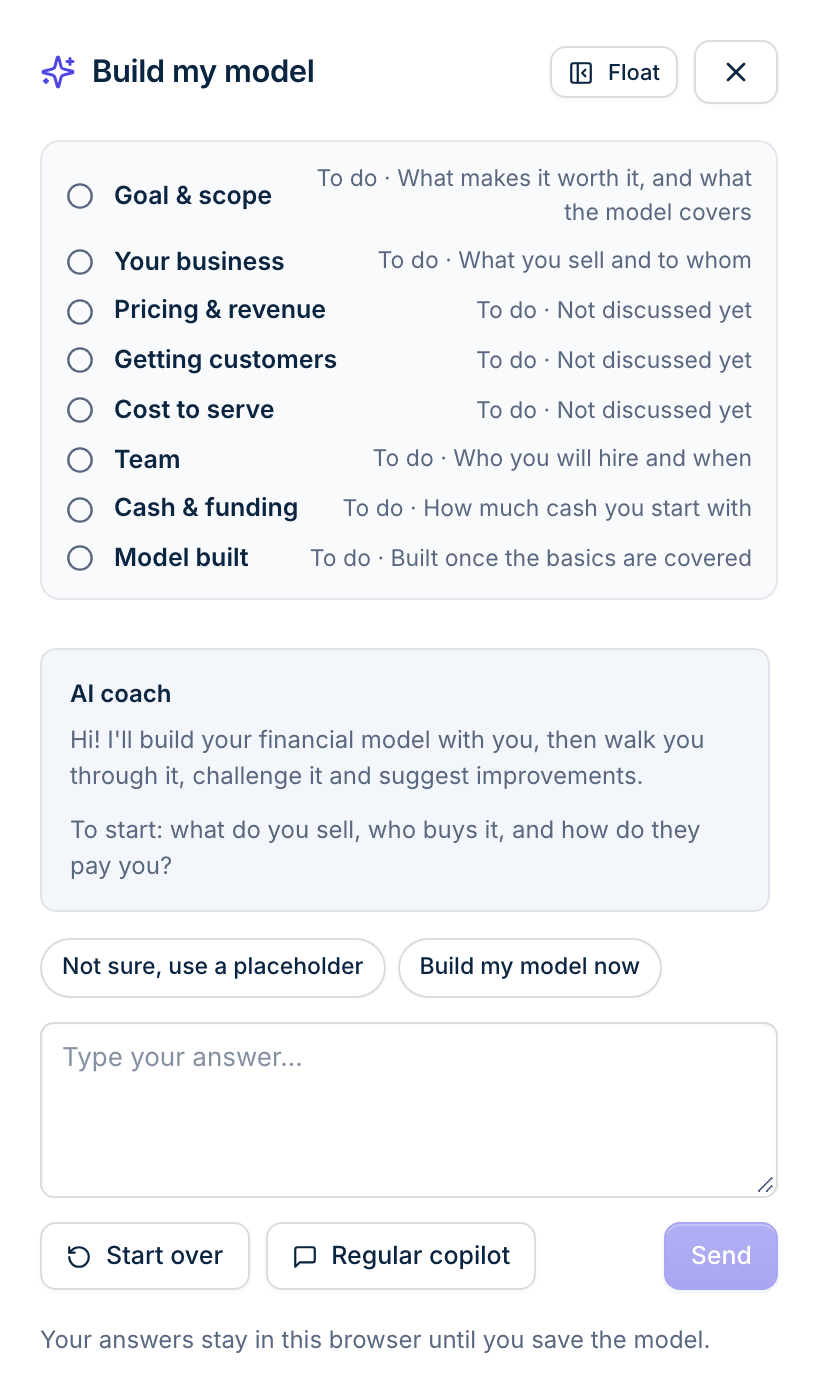
1.Describe it
Answer the coach’s questions in plain language: what you sell, who buys it, how they pay, what it costs to deliver and who you will hire. Don’t know a number yet? Use a placeholder and come back to it.
It builds from a template that fits how you get paid: subscription, usage-based, online store, mobile app, marketplace or services.
2.Read what it means
The overview tells you when you reach profit, the lowest your bank balance gets and what each customer earns you. If an input looks unusual, it says so.

3.Push on it
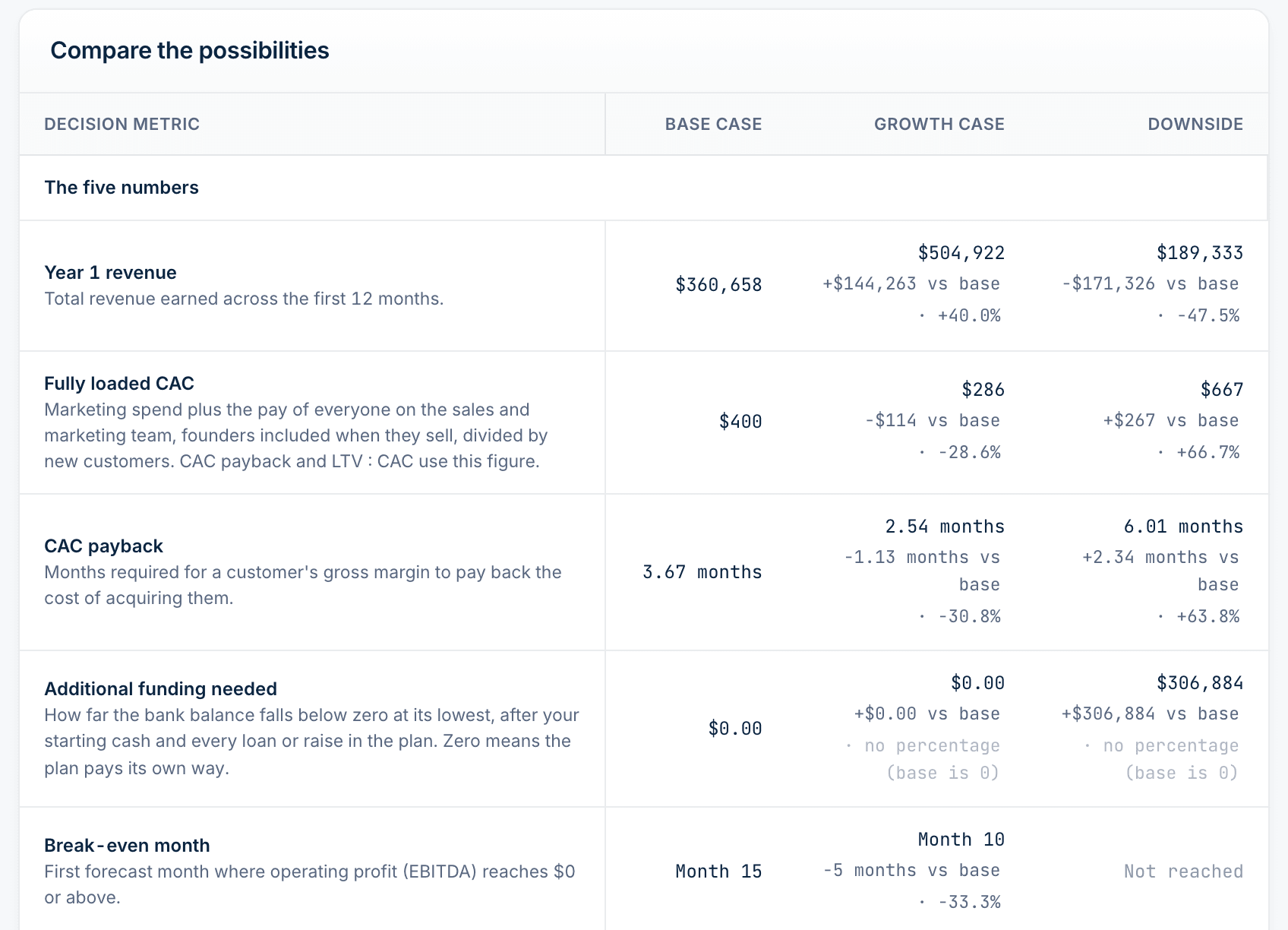
Compare base, growth and downside cases side by side. Use goal seek to find what it takes to hit a target, or ask the Copilot when cash runs out.
| Decision metric | Base case | Downside |
|---|---|---|
| Year 1 revenue | $360,658 | $189,333 |
| Additional funding | $0 | $306,884 |
| Break-even | Month 15 | Not reached |
4.Hand it over
Send an investor a live link to the model, or export to Excel with working formulas. Build an investor update, fundraising memo or board pack as PDF, slides or Office files. The figures come from the model, so they stay right when the plan changes.

Four reasons people open a model.
| If you are | You are asking | You leave with |
|---|---|---|
| A founder raising money | How much do I need to raise, and how long will it last? | Three linked financial statements, a cap table with SAFE and priced-round dilution, an investor link and a fundraising memo. |
| An owner running a business | Can we afford the next hire? When does cash get tight? | A hiring plan tied to the forecast, your cash runway and scenarios to compare before you commit. |
| An entrepreneur testing an idea | Is this worth doing? What would have to be true? | Your break-even point, what each customer really earns you and the most cash you would need, before you spend it. |
| An operator making a business case | Should we open this division, location or product line? | A model of the new line on its own, a downside case beside the plan and a board pack to present it. |
The AI asks the questions. The engine does the math.
A chatbot can write a convincing forecast that doesn’t add up. In Upsweep the AI never calculates a figure. It proposes changes you review, and a separate calculation engine produces every number.
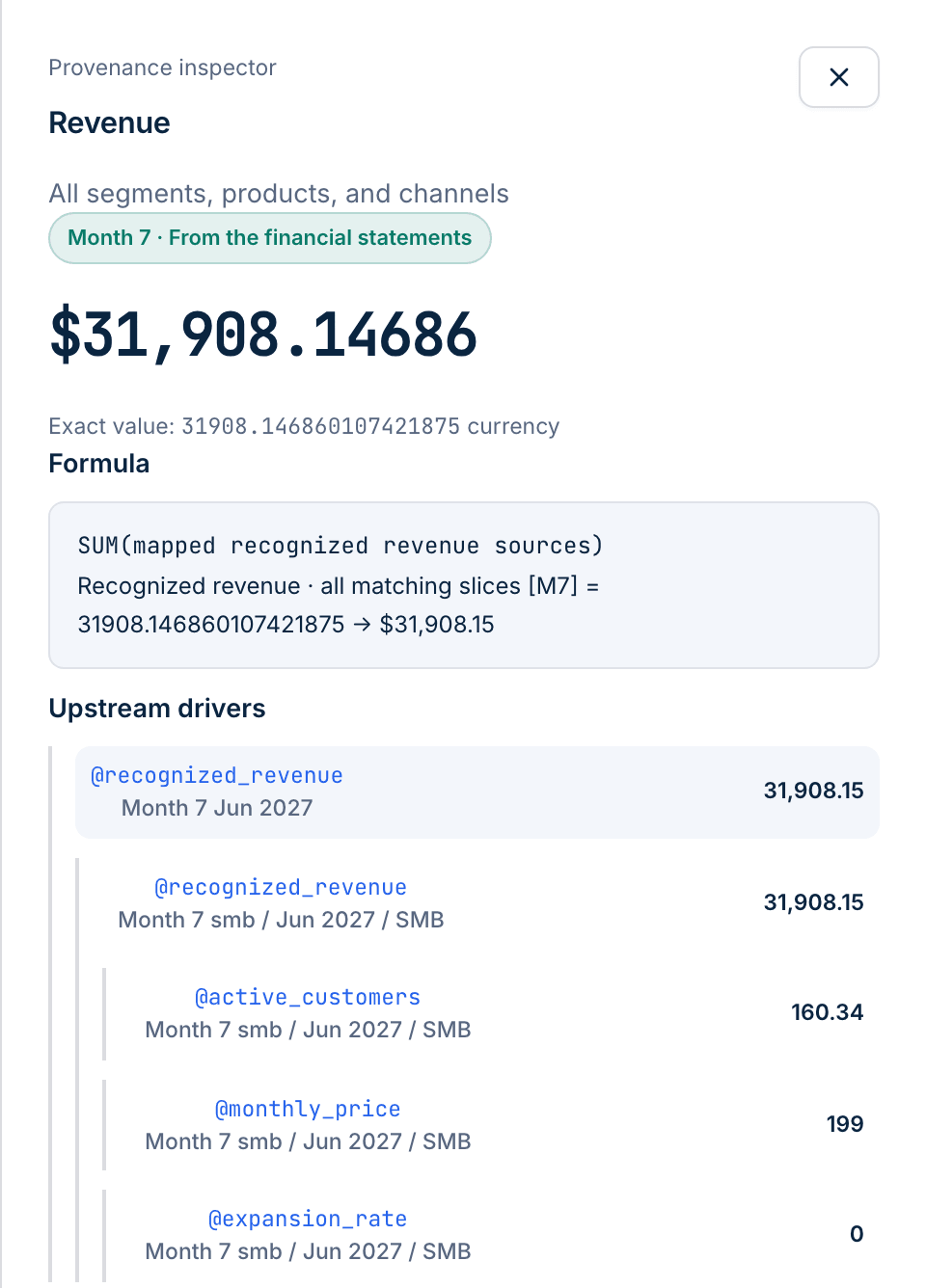
- Click any number
- Every figure opens to its formula and the drivers behind it, down to the customer count and the price.
- Unverified figures get flagged
- If the AI quotes a number it can’t match to your model, the reply marks it where you read it.
- Benchmarks on every release
- The engine has to pass eight benchmark models with known answers, from SAFE dilution to tax-loss carryforwards.
- Excel has to agree
- Exports are recalculated in a separate spreadsheet engine and compared with the model, cell by cell.
Start free. Upgrade when you need a longer forecast or Excel.
| Plan | Per month | Forecast length | Scenarios per model | Excel export | Investor links | People |
|---|---|---|---|---|---|---|
| Free | $0 | 2 years | 2 | CSV only | 1 | 1 |
| Founder | $49 | 5 years | 5 | Included | 5 | 3 |
| Scale | $129 | 10 years | Unlimited | Included | Unlimited | 10 |
| Agency | $299 | 10 years | Unlimited | Included | Unlimited | 25 |
Prices in US dollars per month, as of November 2026. Agency also covers up to 15 client workspaces.
Before you sign up.
Do I need to know finance or spreadsheets?
No. The coach asks about your business in everyday terms: what you sell, who buys it, what it costs. If you do want the detail, every formula and driver is open to read and change.
Can I model something inside an existing business?
Yes. Build a separate model for the division, location or product line, start it with the customers it already has and compare your plan against a downside case. It is a forecast of that line. Upsweep doesn’t connect to your accounting system or import your ledger.
Will the AI make up numbers?
The AI doesn’t calculate them. A separate engine does, and you can click any figure to see its formula. If the AI quotes a number it can’t match to the model, the reply flags it. Your assumptions are still yours, so the forecast is only as good as what you put in.
What kinds of business does it handle?
Templates cover subscription software, usage-priced AI products, online stores, mobile apps, marketplaces and service businesses. The coach picks one by how you get paid, and you can change what it builds.
Can I get the model into Excel?
On paid plans, yes, with working formulas, so an accountant or investor can change an assumption and see it flow through. The Free plan exports CSV with a watermark.
Can I try it without signing up?
Yes. The sample model opens without an account. Building and saving your own model takes a free account.